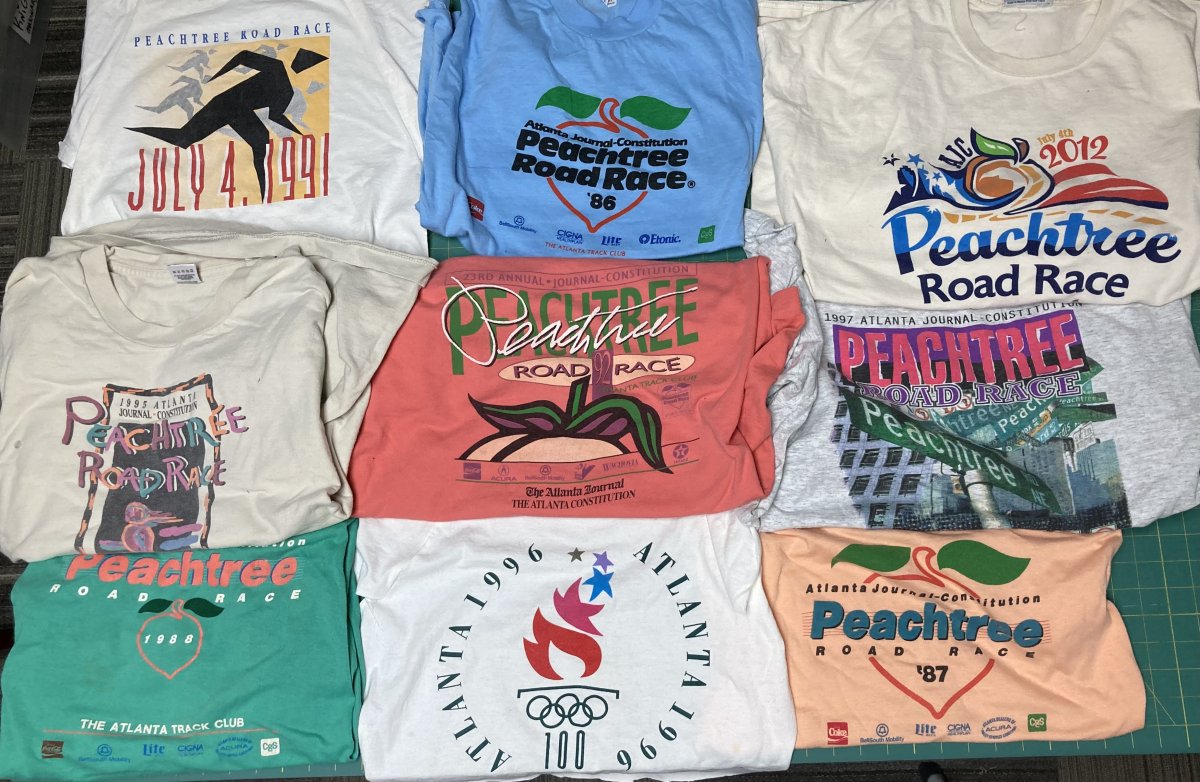
We recommend taking a picture of all of your shirts laid out before shipping them or bringing them in to start your order. This is a record for you of what’s to be included and their condition that we cross check as we start creating a design. Take a picture of all of the sides of the shirts that will be included. Once we receive your shirts, we will inventory them against your photo. If there is something specific to communicate to us regarding a particular shirt individual pictures and notes can help.
If you don’t have time to do a photo, you can also safety pin those sides that you want to include in your quilt. A safety pin indicates if you want the front, back, pocket or sleeve included. Anything not safety pinned or noted will not be included in the design. If a shirt only has one side you don’t have to safety pin it.
It’s optional, but if you have a certain order that you want your shirts to appear in include that, too. We will always balance for color and share the arrangement with you for your approval before we start cutting and sewing.
What if the detail you most want to preserve is easy to miss in a quick snapshot? T-shirts hold more than bold front graphics: names, dates, sleeve designs, and worn-in details can all carry meaning. If you’re wondering how to take pics that help guide your quilt, clear photos of those details can document those features and make your placement preferences easier to explain.
It’s natural to want each shirt represented thoughtfully, especially when the collection feels more like a story than a stack of garments. Photograph the shirts as a group first. Then add any details you want to highlight, including short notes about your preferences. Those provide helpful context for the computer design. Once the design is approved a separate physical wall layout is prepared where the shirts are put on the wall in the final arrangement for your quilt. The wall layout gives you a final chance to review the quilt composition before cutting begins. Photos support planning, while the actual shirts and your design approval remain essential.
Why Take Pics of Your Shirts Before Planning a T-Shirt Quilt?
A photo of all of your shirts serves as a record of what you’re providing. It records graphics, text, wear, and distinctive features. While planning, it can help you remember why a particular shirt matters, especially when several pieces have similar colors or designs. A note such as “keep the full team name visible” gives clear direction instead of leaving an important preference to memory.
Use each image as a reference when explaining which details matter and how you’d like the shirts arranged. Clear framing and legible details make your references easier to understand during design planning.
A planning photo is a visual note, not a substitute for the actual garment used to make the quilt.
Which shirt details are worth photographing?
Take pics of the full front, then photograph the back or any other area with meaningful artwork, lettering, names, or dates. Capture details that might otherwise be overlooked, including faded graphics, small holes, unusual hems, or a shape that could affect how the design is represented.
- Show the entire front graphic so its scale and placement are clear.
- Photograph meaningful back designs, sleeve graphics, or other details separately if they’re hard to see in one frame.
- Include visible wear or distinctive features you’d like considered in the design.
- Add a short instruction if a detail needs special attention or if you would like us to make a change such as repair a hole or remove buttons.
You can mark a preference directly on a photo, attach a Post-it note, or use a safety pin to indicate an area on the garment. Be specific about what matters: for example, note that a name should stay readable or that a particular graphic is the priority. Or maybe you want a name removed. Often people don’t want the sponsors included that are on the back of race shirts. If that entire side is excluded, don’t safety pin it and we’ll ignore it. If you want to show a detail on both sides, safety pin or photograph each side and label the images clearly.
How to Take Clear Pics of T-Shirts for Quilt Planning
A straightforward flat-lay keeps attention on the shirt, not the surroundings. Choose a clean, plain surface with enough room to spread out the garment. Smooth it gently by hand so folds don’t hide lettering or change the shape of a graphic. Don’t stretch the fabric, which can distort how the design appears.
- Lay the shirt flat on a neutral, uncluttered background.
- Smooth wrinkles and arrange the sleeves so the garment’s shape is easy to see.
- Position your camera directly above the shirt and frame the full design.
- Take the photo, then check that important details are visible before moving on.
Soft, even light helps reveal colors and text. Daylight near a window can work well. Avoid direct sun, which may create sharp shadows, and check that overhead lighting isn’t casting a strong yellow tone. Keep the camera steady and leave a little space around the shirt so its edges aren’t cut off.
A useful reference photo shows the complete graphic without cropping any important details.
Phone camera or webcam: what is enough for a shirt photo?
An ordinary phone or laptop camera is usually enough to document a garment for planning. The goal isn’t a polished fashion image; it’s a faithful reference. Before keeping the shot, zoom in or review it at full size to make sure names, small lettering, and graphic edges are legible. Skip filters and decorative effects, which can alter colors or obscure details.
If you’re photographing several garments, label the images or keep them together in an album for the quilt project. Clear, consistent photos make it easier to share your preferences as you plan a T-shirt quilt design. If a detail looks blurred, adjust the light or camera position and retake the picture.
How Shirt Photos Support T-Shirt Quilt Design and Approval
Photos can help turn your preferences into clear design guidance. An image paired with a brief note can identify which graphic should stand out, which details feel most personal, or how you hope a shirt will be represented. The actual garments remain central to making the quilt, so use photos to explain your preferences rather than as replacements for the shirts.
At Just T-Shirt Quilts, the design review includes two distinct ways to consider the arrangement. First, a digital mock-up lets you see the color arrangement before cutting begins. Then a physical wall layout provides another opportunity to review how the actual shirts look together and confirm the composition.
Your approval comes through reviewing the design, not from a photo alone.
From reference photos to a reviewed quilt layout
As you take pics, think about what each image can explain. Perhaps one shirt carries the most important lettering, or a particular graphic should have a prominent place. Add a concise preference to connect that detail to your overall vision. The computer mock-up you’ll receive from us brings the shirts into a proposed arrangement, making it easier to consider balance, spacing, and how graphics relate across the quilt. Note that the actual photos are not uploaded and included in the mockup unless you request it. The shirts in the mockup will be represented by colors.
The physical wall layout is a separate review step, not just another version of the photo. It lets you assess the arrangement as a whole and confirm the design before the work moves forward. For a closer look at the possibilities of a more free-form composition, explore The Art of the Freestyle T-Shirt Quilt.
Let Your Shirt Collection Take Shape
Your shirts already hold a story. Clear photos and specific notes can help communicate what matters to you, while the garments themselves remain at the heart of the quilt. Just T-Shirt Quilts creates heirloom-quality quilts and has been doing so since 2011. You will review the arrangement in a digital design mock-up and a separate physical wall layout.
When you’re ready to take pics and start imagining how the pieces might come together, explore the quilt design possibilities at Just T-Shirt Quilts. Request an estimate to take the next step toward turning your saved shirts into a meaningful quilt.
Frequently Asked Questions
Can I take pics of a shirt with my phone camera?
Yes, a phone camera can capture useful shirt references. If you’re photographing several garments, give each image a recognizable filename or keep the photos grouped in an album labeled for the quilt project. That makes it easier to match an image to the right shirt later, especially if the collection includes similar team or event shirts.
How do I take a picture of a shirt without holding it?
Lay the shirt on a flat surface and position your phone above it, so both hands are free to arrange the garment. If you’re taking the photo yourself, set the phone on a stable support and use its timer or a remote shutter if available. Keep the camera parallel to the shirt to avoid a skewed view.
Can I use photos to show special instructions for a T-shirt quilt?
Yes, photos can accompany instructions and clarify which shirt or detail you mean. This is the most important part of taking the pictures. For example, label a photo “no sponsors” or “front pocket only” and add a brief note describing your preference. This is especially useful if you’re sharing several images. Keep the actual garment with the project, since the photo is reference material rather than a replacement for the shirt.
Do I need filters or special camera equipment to photograph shirts?
No, you don’t need filters or specialized equipment for planning photos. A basic camera is enough if the image clearly records the garment. Before shooting, wipe fingerprints from the phone lens, then tap the screen to focus on small lettering or a detailed graphic. Natural-looking color is more helpful for planning than an effect that changes the shirt’s appearance.